Purview Deployment Blueprint
The Microsoft Purview engineering team recently identified the 4-pillar model, the “crawl, walk, run” approach, and the focus on data classification vs. data protection as counterproductive. Maxime Bombardier from Microsoft introduces the new model and the change in thinking here:
“What if we changed the behavior within organizations from labeling 3-5% of documents to secure and flipped this around to securing everything and training users on what not to secure? What are labels for? Are they for classification? Or are they for protection? They are for protection.”
The Purview deployment blueprint guides the recommendations in this document. Last week a Microsoft 365 Copilot deployment blueprint was released to cover internal oversharing.
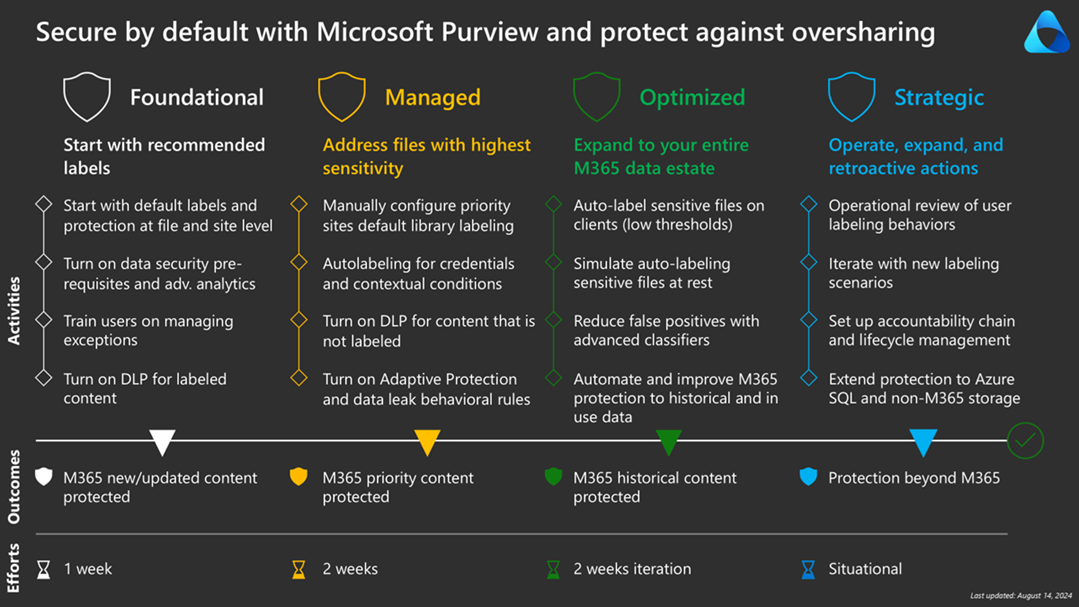
Foundational
Microsoft’s new guidance aims to shift the focus from classification to protection. The first step is to design sensitivity labels for minimal disruption yet maximal protection by default. We propose labeling documents as Confidential by default, allowing users to remove the Confidential label if needed, and avoiding email encryption.
Enable container sensitivity labels by enabling assignment to Microsoft 365 groups in Microsoft Entra ID and synchronizing labels from Security & Compliance to Entra. This enables setting a default label for new/modified docs and enables automatic labeling for existing docs. Here are the required (one-time) PowerShell scripts for these Entra and Security & Compliance settings.
# install graph modules
Install-Module Microsoft.Graph -Scope CurrentUser
Install-Module Microsoft.Graph.Beta -Scope CurrentUser

# connect to MIcrosoft Graph
Connect-MgGraph -Scopes "Directory.ReadWrite.All"

# attempt to create to ensure it exists
# EnableMIPLabels: can Microsoft Information Protection labels be assigned to Unified Groups
$template = Get-MgBetaDirectorySettingTemplate | Where-Object { $_.DisplayName -eq "Group.Unified" }
$settingParams = @{
TemplateId = $template.Id
	Values = @(
		@{
			Name = "EnableMIPLabels"
			Value = "True"
		}
	)
}
New-MgBetaDirectorySetting -BodyParameter $settingParams

# verify new directory setting and set it again
$grpUnifiedSetting = Get-MgBetaDirectorySetting -Search DisplayName:"Group.Unified"
$valueParams = @{
	Values = @(
		@{
			Name = "EnableMIPLabels"
			Value = "True"
		}
	)
}
Update-MgBetaDirectorySetting -DirectorySettingId $grpUnifiedSetting.Id -BodyParameter $valueParams

Import-Module ExchangeOnlineManagement
Connect-IPPSSession -UserPrincipalName "XXX@XXX.COM"
Execute-AzureADLabelSync
Disconnect-ExchangeOnline
Managed
The focus of this phase is recommending stronger protection for identified sensitive data:
· A new higher-protection sensitivity label less-easily removed by end users
· Well-known sites, including sites used by leadership can be labeled with this more sensitive label
· Similarly, detected credentials is a high-confidence detection and so can be auto-labeled
· Documents identified based on trainable classifiers and sensitive info types can suggest labels
With the foundation in place, we can focus on unlabeled content and risky behavior detection:
· Data Loss Prevention rules for unlabeled content
· Insider Risk Management + Adaptive Protection to detect risky behavior
Optimized
We can then move to auto-labeling (vs. just recommending labels) as we better understand our data.
· Client-side auto-labeling based on sensitive content
· Service-side auto-labeling based on context
· Custom Sensitive Info Types and Custom Trainable Classifiers
· Scripting sensitivity labels in SharePoint Online
Strategic
In this final phase, we implement operational procedures and expand beyond Office 365:
· Review unlabeled sites, discrepancies between item and site labels, risky user behavior
· Secure collaboration with trusted partners (pull this forward)
· Tented projects (pull this forward)
· Scanning on-premises assets
· Bring Your Own Key (BYOK) and Double Key Encryption (DKE)
· Accountability chain and lifecycle management
· Azure SQL and non-Microsoft 365: see Structured Data Governance for Purview Data Map, column-level classification, Power BI RLS, and Copilot grounding for replicated ERP/CRM data
📩 Don't Miss the Next Solution
Join the list to see the real-time solutions I'm delivering to my GCC High clients.