Shared Services and Conglomerate Tenants
A parent company may want to operate one GCC High tenant as a shared compliance platform for multiple operating subsidiaries, each of which may undergo its own CMMC Level 2 assessment at different times. This chapter assesses whether that architecture is technically and contractually defensible, and where it breaks down under C3PAO scrutiny.
Throughout, ParentCo refers to the corporate parent that owns the shared-services tenant and IT organization, and OpCo refers to an operating subsidiary that consumes ParentCo's tenant as a service. Multiple OpCos (OpCo A, OpCo B, …) coexist in the same shared-services tenant.
The central question. Can one tenant hold multiple OpCos such that (1) ParentCo IT carries logging and compliance responsibility, (2) OpCos cannot see each other's users or content, and (3) a C3PAO will assess one OpCo without pulling siblings into scope?
Short answer. There are three defensible architectures: presented in the Decision framework below as Option A (Unified Tenant), Option B (Individual Tenants, Shared AVD Infrastructure), and Option C (Individual Tenants, Individual AVD Infrastructure). Option A matches ParentCo's stated preference and can be made defensible, but it is a scope-sharing outcome, not a scope-reduction outcome: ParentCo's shared services land inside every OpCo assessment as Security Protection Assets. Options B and C are prepared fallbacks for different degrees of C3PAO pushback on sharing.
Glossary
- AU: Administrative Unit. An Entra ID container that scopes administrative permissions (e.g., password reset) to a subset of users, groups, or devices. A Restricted Management AU additionally prevents tenant-level admins from modifying in-scope objects. AUs do not prevent standard users from reading directory data outside the AU.
- IB: Information Barriers. A Microsoft Purview feature that blocks discovery and collaboration between defined segments of users across Teams, SharePoint, and OneDrive. Multi-segment mode allows designated users (e.g., ParentCo oversight) to be compatible with multiple segments simultaneously.
- ABP: Address Book Policy. An Exchange Online policy that presents each user with a filtered view of the Global Address List. A virtual separation of directory visibility only; does not block mail delivery or prevent Graph-level enumeration.
- PIM: Privileged Identity Management. The Entra feature that makes privileged roles eligible rather than permanently assigned, requiring just-in-time activation with approval, MFA, and time limits.
- DLP: Data Loss Prevention. Microsoft Purview policies that inspect content for sensitive data and enforce actions (block, warn, encrypt, audit) across Exchange, SharePoint, OneDrive, Teams, and endpoints.
- EEEU and Everyone: "Everyone Except External Users" is a built-in SharePoint claim that includes every internal user in the tenant; "Everyone" additionally includes authenticated guests. Using either claim for sharing inside a shared-services tenant flattens OpCo boundaries and must be prohibited and monitored. Data Access Governance reports surface both.
- RAC: Restricted Access Control (SharePoint). A per-site setting that requires a user to be in a designated Entra security group in addition to holding normal site permissions. Acts as a second gate that overrides inherited or inherited-link access.
- SPA: Security Protection Asset. A CMMC scoping category for assets that provide security functions to the assessed environment, whether or not they process CUI. Under CMMC, SPAs are in assessment scope alongside CUI Assets.
- SPD: Sensitive Program Data. The program-identifying context (codenames, platform designators, customer names, contract numbers) whose presence in metadata like group names, site URLs, or channel titles reveals CUI-related program information even when the underlying content is protected. Req-9 addresses SPD leakage in metadata.
Decision framework
Three architectures meet the business requirement with different degrees of sharing between ParentCo and the OpCos. They are listed in order of how much is shared: from most unified (Option A) to most separated (Option C). The right answer depends on what the C3PAO will accept for any given OpCo's assessment.
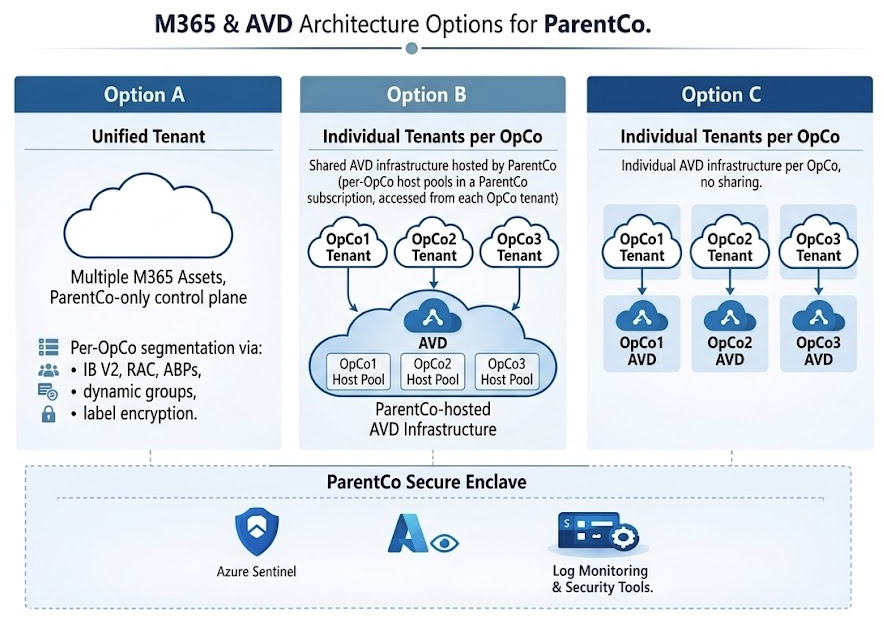
| Option | Architecture | OpCo isolation | Independent assessment | Assessor acceptance |
|---|---|---|---|---|
| Option A | Unified Tenant: multiple M365 assets, ParentCo-only control plane, per-OpCo segmentation via IB V2, RAC, ABPs, dynamic groups, and label encryption | Strong segmentation, policy-enforced only: platform boundary is the tenant, not the OpCo | No: ParentCo services are SPAs in every OpCo assessment | Moderate; depends on C3PAO experience with shared-services tenants and on the rigor of the Shared Responsibility Matrix and evidence pipeline |
| Option B | Shared identity and AVD in ParentCo tenant, per-OpCo tenants for Microsoft 365 / SharePoint / Purview / CUI data. Users sync from on-prem AD into ParentCo only; cross-tenant synchronization provisions B2B guest accounts into each OpCo tenant; cross-tenant access policies (XTAP) trust ParentCo MFA + device compliance | Platform boundary at the data layer: each OpCo's CUI is in its own tenant with its own labels, DLP, and Purview audit. Identity and session boundaries are policy-enforced via B2B + XTAP rather than platform-enforced | Each OpCo assesses its own tenant independently for CUI custody. ParentCo's identity, AVD, MDE, Intune, and Sentinel are SPAs in every OpCo's assessment: same SPA list as Option A, with the difference that the CUI itself is partitioned per OpCo | High for the per-tenant CUI boundary; Moderate-to-High for the SPA narrative, dependent on ParentCo holding its own L2 assessment posture that OpCos inherit |
| Option C | Individual Tenants per OpCo, individual AVD infrastructure per OpCo, no sharing | Complete: every layer is per-OpCo | Yes: each OpCo's assessment is fully independent of siblings | High; cleanest story for the C3PAO. Highest cost, slowest to deploy, and loses every shared-services efficiency |
How to use this framework. ParentCo's stated preference is Option A (one tenant, shared security platform, OpCos as tenants of the tenant). Options B and C are prepared fallbacks in case a C3PAO balks:
- If the C3PAO accepts a shared-services tenant with a signed Shared Responsibility Matrix (Req-10) and evidence that the Req-1 through Req-9 controls are continuously enforced, Option A holds.
- If the C3PAO rejects co-residency of CUI content across OpCos in a single tenant (insisting that each OpCo's CUI live behind its own platform-enforced data boundary), fall back to Option B. Each OpCo gets its own GCC High tenant for CUI data only: SharePoint, Exchange, OneDrive, Purview labels, DLP. Identity, AVD, Intune, MDE, and Sentinel stay in ParentCo's tenant; users access OpCo data via cross-tenant synchronization plus B2B guest access plus cross-tenant access policy trust. The SPA narrative for each OpCo's assessment is essentially the Option A list, but the CUI itself is partitioned per OpCo at the platform layer rather than per-OpCo via policy controls.
- If the C3PAO further rejects sharing anything (treating even shared identity, AVD, or Sentinel as unacceptable cross-OpCo risk), fall back to Option C. Each OpCo operates a fully sovereign environment with its own identity tenant, its own AVD fleet, its own security stack. ParentCo's shared-services value is limited to governance, policy templates, and playbooks rather than operational infrastructure.
The chapter body that follows details Option A. The mapping table, three-layer model, requirement sections, and Shared Responsibility Matrix are the minimum engineering content required to defend Option A at assessment. Options B and C inherit most of the same requirements but apply them within each OpCo's tenant instead of across the shared tenant.
Three-layer model
A defensible single-tenant design must implement all three layers. No single layer is sufficient alone.
| Layer | Question it answers | Primary controls |
|---|---|---|
| Identity | Who exists, who can sign in, what admin scope applies per OpCo | AD → Entra sync, CompanyCode attribute, dynamic groups, AUs for delegated helpdesk, PIM, restricted portal/Graph access |
| Data | What each OpCo can see, send, store, and label | Information Barriers (multi-segment), SharePoint Restricted Access Control, Exchange mail flow rules, ABPs, sensitivity labels, DLP |
| Resource | Which resources and sessions each OpCo user can reach | Conditional Access (per-OpCo dynamic groups), AVD host pools per OpCo, Intune scope tags and device filters, SPO/Teams permissions |
Requirement to platform mapping
| Requirement | Layer | Primary controls | 800-171 | See |
|---|---|---|---|---|
| OpCo users cannot enumerate sibling OpCo users | Identity | IB V2 (Teams + SPO/ODB people picker), AllowedToReadOtherUsers=false, per-OpCo ABPs covering all Exchange address-list types, SPO people-picker hardening (SearchResolveExactEmailOrUPN, claim removal), CA block of Graph/Azure Mgmt for non-admins, Delve/Viva people-graph disabled | 3.1.1, 3.1.2 | Req-1 |
| OpCo users cannot access sibling SPO/ODB/Teams content | Data | IB, SPO Restricted Access Control, ban EEEU, private Groups, disallow sharing outside RAC | 3.1.3, 3.1.22 | Req-2 |
| OpCos cannot email each other except via sanctioned bridge | Data | Exchange transport rules, ABPs per OpCo | 3.1.3, 3.13.1 | Req-3 |
| OpCo sessions reach only OpCo-approved resources | Resource | CA per OpCo, AVD host pools per OpCo, Intune scope tags | 3.1.1, 3.1.12, 3.1.16 | Req-4 |
| ParentCo IT delivers logging and audit evidence | Identity+Data | Sentinel workspace (ParentCo-owned), Purview Audit, per-OpCo workbooks, scoped RBAC | 3.3.1–3.3.9 | Req-5 |
| OpCo delegated admin without tenant-wide authority | Identity | Restricted Management AUs, PIM, ParentCo retains all service admin roles | 3.1.5, 3.1.6, 3.1.7 | Req-6 |
| C3PAO accepts OpCo-only assessment scope | Scoping | SPA inventory, control inheritance matrix, boundary diagram, evidence schedule | Scoping Guidance | Req-7 |
| On-premises AD remains identity source of truth | Identity | CompanyCode stamped at OU level, cloud-only break-glass outside AD | 3.1.1, 3.5.1 | Req-8 |
| OpCo metadata does not leak SPD context via group, site, or channel names | Identity+Data | Entra group naming policy with mandatory OpCo prefix and opaque suffix, restricted group creation, opaque SPO site URLs at provisioning, no program codenames in display names | 3.1.3, 3.1.22, 3.8.2 | Req-9 |
| Shared Responsibility Matrix published and maintained | Scoping | Signed SRM defining every control by owner (ParentCo shared service, OpCo local, joint), with RACI, change-control path, and review cadence | 3.12.4, 3.14.1 | Req-10 |
Where shared services reduce OpCo scope
The ParentCo platform is not only a source of SPA entanglement, it is also a source of scope reduction when used deliberately:
- AVD enclave per OpCo. If OpCo CUI work happens inside ParentCo-managed AVD session hosts (one host pool per OpCo, scoped by Entra security group), then OpCo physical workstations never process CUI. Those endpoints become CRMAs at most, not CUI Assets, and fall out of OpCo's CMMC scope. ParentCo runs one Intune baseline, one MDE deployment, one set of session host hardening, and inherits that posture into every OpCo assessment. Pattern detail in Chapter 21 (AVD — Enclave in Existing Tenant).
- Sensitivity labels with encryption as a content-layer gate. Per-OpCo labels that encrypt to the OpCo's rights group mean a leaked file remains unreadable to sibling OpCos even if RAC, IB, or sharing controls misconfigure. Encryption travels with the content; it does not depend on the file's location. This converts a single-layer location-control failure into a contained event rather than a breach.
- Centralized DLP, Sentinel, MDE, and Purview Audit. ParentCo operates these once; every OpCo inherits the same monitoring and response posture rather than each OpCo standing up and proving its own SOC. The SPA narrative is real, but so is the operational and evidentiary leverage.
Net scope often comes out smaller, not larger, when AVD and label encryption are part of the design, even after accounting for the SPA expansion.
Operational concerns
What OpCos give up by sharing a tenant instead of owning their own:
- No independent IT autonomy: CA, Intune, DLP, retention, branding are all ParentCo-controlled.
- No raw log access: OpCo IR reviewers get sanitized workbooks or scoped Sentinel RBAC, not direct audit-log queries.
- Tenant-wide settings are one-size-fits-all: strictest OpCo requirement wins for external sharing, guest access, consent, enrollment restrictions.
- GCC High feature gaps apply to all OpCos equally: notably, "restricted site creation by users" is unavailable, so provisioning discipline replaces self-service.
- Change velocity is ParentCo-paced: OpCo urgency does not override ParentCo change windows.
- Divestiture is a migration, not a split: separating an OpCo later requires full tenant-to-tenant migration.
- Licensing and costs bill to ParentCo; chargeback to OpCos is manual via CompanyCode attribution.
Auditor concerns
Security and trust boundaries between OpCos rely on critical controls in the ParentCo tenant. Inadvertent misconfiguration may break these boundaries. A Shared Responsibility Matrix is mandatory.
Where a C3PAO will push hardest on a single-tenant design:
- SPA entanglement is permanent. ParentCo identity, CA, Intune, Purview, DLP, Sentinel, and mail-flow rules protect every OpCo's CUI environment and therefore enter every OpCo assessment as Security Protection Assets. Single tenant does not reduce scope; it shares scope.
- Policy-enforced boundary, not platform boundary. Assessor will test each layer: IB segments and compatibility policy, ABPs, transport rules, RAC, sharing-outside-RAC setting, EEEU usage, group creation control, user consent,
AllowedToReadOtherUsers, Graph/Azure Mgmt CA blocks. One missing layer is one finding. - Continuous enforcement, not point-in-time config. Monthly evidence: DAG EEEU reports, IB audit events, group creation log, SPO external sharing report.
- Admin blast radius. A compromised ParentCo admin reaches all OpCo CUI by design. Mitigate with phishing-resistant MFA, PIM with approval, break-glass in RMAU, admin-workstation CA filtering, JIT activation, admin activity monitoring.
- Email boundary fragility. IB does not cover mail. Transport-rule change control is a first-class compliance artifact.
- AUs are not an isolation control. Present AUs only as delegated-admin scoping; do not claim them as the boundary.
- Group and site names are metadata, not content, and leak independently. A C3PAO will ask whether a group called "F-35 ECM Team" can be observed by sibling OpCos or ParentCo operators even without access to its content. The answer must be "the name itself reveals nothing": enforced by a naming policy that strips program context, not by hoping no one reads the logs. See Req-9.
- Assessor variance. Select a C3PAO with GCC High multi-tenant experience before committing to single-tenant architecture.
Requirement sections
Each section follows the same shape: Requirement · Controls · Configuration · Evidence · Residual risk · 800-171 mapping. Sections forward-reference the Identity, Data, Device, and Monitoring phases where the pillar implementation already lives.
Req-1
Identity enumeration containment. Enumeration happens through multiple independent surfaces: Graph, Exchange address lists, the SharePoint/OneDrive people picker, Teams search, and the people-graph surfaces (Delve, Viva, Org Explorer). Each surface has its own control plane. The Req-1 stack must cover all of them.
Graph layer. Disable default user directory read (AllowedToReadOtherUsers=false) as the primary gate: Microsoft documents that with this setting a non-admin delegated caller receives a 401 from the /users endpoint regardless of which client or which granted scope is used.1 Layer on: disable user app registration (AllowUsersToCreateApps=false), disable user consent, restricted Entra portal access, and CA block of Microsoft Graph Command Line Tools, Graph Explorer, Azure CLI, Azure Management, and WAAD for non-admins.
Teams layer. IB V2 (not V1) segments with allow-list compatibility. ParentCo oversight users in all segments.
Exchange layer. Per-OpCo ABP that explicitly assigns per-OpCo versions of every address list type: GAL, All Rooms, All Distribution Lists, All Public Folders, All Contacts. Tenant-wide default lists must not be inherited by OpCo mailboxes.
SharePoint / OneDrive people picker. The picker is a separate code path from Graph and Exchange; AllowedToReadOtherUsers=false and IB V1 do not cover it. Required controls:
- Enable Information Barriers V2 at the tenant and associate each OpCo site with its segment (
Set-SPOSite -InformationBarriersMode). IB V1 leaves the picker open. Set-SPOTenant -SearchResolveExactEmailOrUPN $true: picker requires an exact UPN rather than fuzzy-searching the directory. Single most effective control against casual sibling browsing.Set-SPOTenant -ShowEveryoneClaim $falseSet-SPOTenant -ShowEveryoneExceptExternalUsersClaim $falseSet-SPOTenant -ShowAllUsersClaim $falseSet-SPOTenant -ShowPeoplePickerSuggestionsForGuestUsers $false
People-graph surfaces. Disable Delve analytics (Set-SPOTenant -DelveAnalyticsEnabled $false), restrict Viva Insights people-graph features, and verify the Outlook "Organization Explorer" surface respects ABP.
Residual for standard users. Contact-graph surfaces (/me/people, recipient suggestions from prior interactions) remain scoped to people the user has already interacted with, which is exactly what IB V2 and ABP are there to constrain. Platform drift (new first-party apps, new Graph routes, new pickers) requires quarterly re-validation of this control set.
Req-2
Content isolation (SPO/OneDrive/Teams). IB policies, SPO Restricted Access Control driven by CompanyCode dynamic groups, disallow sharing outside RAC, EEEU ban with DAG monitoring, public Teams blocked, sensitivity labels enforcing private Groups. Add per-OpCo sensitivity labels with encryption keyed to the OpCo's rights group as a content-layer complement to the location-layer controls: RAC and IB are gates on where the file lives; encryption is a gate on what the file is. A sibling OpCo user who obtains the file through a misconfigured RAC, an exception, or a forwarded link still cannot decrypt it. This is the single most important defense-in-depth against location-control drift.
Req-3
Email isolation. Exchange transport rules blocking inter-OpCo SMTP with named ParentCo exception groups, ABP per OpCo, DLP for CUI mail, CAB-gated rule changes.
Req-4
Session and resource reach. CA per OpCo with CompanyCode dynamic groups, AVD host pools and application groups per OpCo, Intune scope tags and device filters. Use the AVD enclave pattern (Chapter 21) per OpCo as the default workplace for CUI work: it keeps OpCo physical workstations out of CUI Asset scope, lets ParentCo inherit a single hardened baseline into every OpCo assessment, and pairs with Req-2 label encryption so that data and session both remain inside the OpCo's enclave.
Req-5
Logging as a service. How Sentinel serves multiple OpCos depends on which architecture option is in play.
Option A (unified tenant). Single Sentinel workspace owned by ParentCo. Native connectors (XDR, Entra ID, M365, Defender for Cloud) all connect locally: no custom plumbing. Per-OpCo custom tables or workbooks segment the data for scoped access. OpCo RBAC scoped to own-OpCo data via Sentinel workspace-level RBAC or resource-context RBAC. Purview Audit retention per OpCo legal requirement. Evidence binder template reused per assessment.
Option B (shared identity / AVD, per-OpCo data tenants). Sentinel runs in two places. ParentCo operates one Sentinel workspace in the ParentCo tenant: native connectors ingest the identity / AVD / Intune / MDE / firewall / Defender for Cloud telemetry that all originates from ParentCo. Each OpCo operates its own Sentinel workspace in the OpCo tenant: native M365 connectors (Office 365 audit, Exchange, SharePoint, Purview Audit) only ingest from their home tenant and stay local to it. ParentCo's SOC uses Azure Lighthouse to delegate access into each OpCo's workspace and runs cross-workspace queries (workspace('law-opco-a').OfficeActivity | union workspace('law-opco-b').OfficeActivity) for centralized hunting across the M365 surfaces. The ParentCo workspace is the single source of truth for session-host and identity telemetry; the OpCo workspaces are the per-OpCo source of truth for M365 content events. Cross-workspace queries are slower than local queries at high volume but avoid custom ingestion pipelines.
Option C (per-OpCo everything). Each OpCo tenant runs its own Sentinel workspace with native connectors for the full M365 + Entra + Defender + AVD stack: all telemetry is local because all resources are local. ParentCo's role is reduced to optional cross-workspace hunting via Lighthouse where the OpCos opt in. No ParentCo-side telemetry pipeline because ParentCo holds no operational resources.
Why not ship all OpCo logs to one central workspace? The native M365 data connectors (XDR, Entra ID sign-in/audit, Office 365 audit) are tenant-scoped: they only ingest from their home tenant. Centralizing M365 logs from a separate tenant into ParentCo's workspace requires custom pipelines (Logic Apps, Function Apps, or the Log Ingestion API calling the Management Activity API and Security Graph API). These pipelines work but add engineering cost, maintenance burden, and a failure mode that creates blind spots. Each pipeline also becomes an SPA in every OpCo's CMMC scope. The hybrid model (ParentCo workspace for ParentCo-resident telemetry + per-OpCo workspaces for M365 telemetry + Lighthouse cross-workspace queries) avoids all of this.
For workspace creation steps, naming conventions, and data-connector configuration, see SIEM Strategy.
Req-6
Delegated administration. Restricted Management AUs for OpCo helpdesk, PIM with approval for every eligible assignment, break-glass accounts in RMAU, phishing-resistant MFA on all admins. No OpCo user holds tenant-wide service admin roles.
Req-7
CMMC scoping narrative. SPA inventory (ParentCo shared services), OpCo asset inventory, control inheritance matrix, boundary diagram, evidence schedule. This is the document handed to the C3PAO on day one of an OpCo assessment.
Req-8
Identity source of truth. CompanyCode attribute provisioned at on-premises AD OU level, synced through Entra Connect, cloud-only break-glass accounts outside AD, group writeback posture decided and documented.
Req-9
Metadata hygiene: group, site, and channel naming. Group display names, SharePoint site URLs, and Teams channel names are queryable metadata that persists across audit logs, incident reports, NDRs, calendar invites, and every ParentCo shared-services operator's workspace. Even with IB V2 and label encryption blocking access to the underlying content, a name like "F-35 ECM Team" leaks the program's existence and scope to any observer of the log stream. Req-9 closes this by ensuring the name itself carries no SPD context:
- Enforced naming policy via Entra. Configure the unified group naming policy (
Set-MgDirectorySettingagainst the Group.Unified template) to require anOpCo<X>-prefix followed by an opaque identifier (program register ID, sequential code, or random token). Block reserved substrings: program codenames, platform designators (F-35, AH-64, aircraft and missile names), customer names, contract numbers, and classified monikers. - Restricted group creation.
EnableGroupCreation=$falsetenant-wide with a single ParentCo provisioning group permitted. Pairs withAllowUsersToCreateApps=falsefrom Req-1. - Opaque SharePoint URLs at provisioning. Site URL is generated once from the display name and persists through later renames. Provision with the opaque code (
/sites/opcoa-p00472), set the human-readable display name separately. Renaming after the fact does not rewrite the URL. ConsiderSet-SPOTenant -UseRandomizedSiteNames $truefor any residual self-service path. - Human-readable program context lives in descriptions, not names. Group and site descriptions are not surfaced in URLs, NDRs, or calendar invites. Use them for program context; keep display names opaque.
- Teams channel names follow the same rule.
General,Design,Test,ManufacturingbeatsF-35-Stealth-Coating. - Pre-rollout audit. Inventory every existing group, site, and Team whose display name or URL would leak SPD context. Plan renames and, where URLs carry context, plan site recreation with content migration.
Residual acknowledgement. ParentCo shared-services operators (Sentinel analysts, Purview admins, SPO admins, Exchange admins) will see group and site names in the ordinary course of their work because those names appear in every log and incident record. This is unavoidable in a shared-services tenant. The Req-9 defense is that the names themselves mean nothing to anyone who reads them, not that no one reads them.
Req-10
Shared Responsibility Matrix. Any shared-services design (whether Option A's single-tenant model or Option B's shared identity / AVD with per-OpCo data tenants) is held together by a large number of individually small controls spread across ParentCo, each OpCo, and a handful of joint processes. Without a published, signed Shared Responsibility Matrix (SRM), no one knows who is accountable for what, and a C3PAO has no way to evaluate whether the claimed boundaries are operationally real.
The baseline SRM (applies to Options A and B; for Option C the SRM is optional because each OpCo runs its own stack) must:
- Enumerate every control that participates in the OpCo boundary: the IB V2 policy, ABPs, transport rules, RAC, group naming policy, SPO tenant settings, CA policies, AVD host pool configuration, Sentinel content, DLP rules, label taxonomy, and every item listed in Req-1 through Req-9.
- Assign a single accountable owner to each control, framed as ParentCo shared service, OpCo local, or joint. "Joint" requires a named ParentCo contact and a named OpCo contact.
- Use RACI where joint. For joint controls (e.g., a CA policy that excludes an OpCo-specific group), spell out Responsible, Accountable, Consulted, Informed: so the OpCo knows when it must be consulted before a change and when it is merely informed.
- Specify the change-control path. Who submits, who approves, what CAB processes apply, what notice OpCos receive for changes to shared controls, and what veto or escalation rights OpCos have for changes that affect their boundary.
- Define evidence ownership. For each control, which party produces evidence for a CMMC assessment: ParentCo once for all OpCos (inheritance) or per-OpCo.
- Set a review cadence. At minimum quarterly, with a mandatory re-sign whenever an OpCo enters or exits the tenant, a significant architectural change ships, or Microsoft introduces a platform change that affects a listed control.
- Be signed by ParentCo CIO and each OpCo IT leader. The SRM is a contract between the entities that share the tenant.
The SRM is the primary document a C3PAO will ask for before assessing the SPA-inheritance claims in Req-7. If it does not exist, or is not current, every claimed inheritance is open to challenge. Publish it alongside the boundary diagram, the SPA inventory, and the control inheritance matrix from Req-7.
Option B SRM additions. Option B does not require the verbose verbatim risk-acceptance signoff that Option A does (see Risk acceptance below). Option B's risk profile is lower (CUI is platform-partitioned at the data tenant layer) and the architectural choices follow conventional Microsoft cross-tenant collaboration patterns. Instead, the SRM for Option B engagements must include three additions beyond the baseline above:
-
ESP relationship acknowledgment: a one-paragraph signed acknowledgment at the top of the SRM (signed separately by the OpCo CIO or IT lead, in addition to the document-level SRM signature) explicitly recognizing ParentCo as an External Service Provider for the OpCo's CMMC scope, enumerating the SPA list (ParentCo Entra ID, AVD fleet, Intune, MDE, Sentinel, network perimeter), and confirming that the OpCo inherits ParentCo's own L2 assessment posture for those SPAs. This is the forcing-function moment that ensures the subsidiary CIO has read and understood what they're consenting to, distinct from the working contract that follows.
-
Data storage policy commitment: explicit text in the SRM stating that CUI lives only in the OpCo's tenant (SharePoint, OneDrive, Exchange, Purview labels), that the AVD session host is a transit surface during in-place editing and not a CUI storage surface, and that the technical controls enforcing this (RDP property restrictions (no clipboard / drive / USB / printer redirection), no OneDrive Known Folder Move on session hosts, sensitivity-label encryption) are in place. Any CUI found on AVD disk during an investigation is treated as a policy violation rather than a tolerated edge case; the response is procedural (training, label reminders, DLP) rather than architectural. This contractualizes the Data Storage Policy commitment from the AVD scenario chapter.
-
Fallback path to Option C: pre-agreed remediation in the event the OpCo's C3PAO rejects the Option B architecture during assessment. If C3PAO findings preclude Option B for that OpCo, the contracted remediation is migration to Option C: the OpCo stands up its own AVD, Intune, MDE, Sentinel, and network stack in its own tenant. The clause must specify (a) the responsible party for performing the migration, typically ParentCo's IT team using the same reference architecture they deployed for Option B, (b) a maximum timeline from C3PAO finding to operational Option C deployment (90 days is a reasonable default given the runbook's per-tenant timeline), and (c) allocation of migration cost responsibility: whether ParentCo absorbs it as part of the original ESP engagement, the OpCo bears it, or it splits on a documented formula. This converts the informal "Option C is the safety valve" position into a contracted obligation, and gives the subsidiary CIO an explicit commitment to point at if the assessment conversation goes sideways.
Option B architecture detail
Option B is the right answer when a C3PAO accepts ParentCo running the identity, AVD, and security stack but insists that each OpCo's CUI live in its own platform-enforced tenant boundary. The architecture preserves Option A's operational simplicity (one Entra tenant, one Intune deployment, one MDE, one AVD fleet, one SOC) while moving CUI custody (SharePoint, OneDrive, Exchange, Purview labels and DLP) into per-OpCo tenants. Users are members of ParentCo and access OpCo data as B2B guests.
Tenant topology
- One ParentCo Entra tenant holds all user identities. Users are sourced from on-premises Active Directory through Entra Connect or Microsoft Entra Cloud Sync, with OUs corresponding to each OpCo's user population. ParentCo's tenant also holds CA policies, PIM configuration, the Intune service, the MDE service, the AVD fleet (firewall, VNet, workspace, host pools, session host VMs), the shared Sentinel workspace, and the Recovery Services Vault.
- One Microsoft 365 tenant per OpCo holds that OpCo's SharePoint sites, OneDrive, Exchange mailboxes, Purview labels, DLP policies, and Purview Audit. Each OpCo tenant has its own Entra ID instance as a side-effect of being a Microsoft 365 tenant, but that Entra is only used as the directory backing the OpCo's M365 services: it is not the identity provider users authenticate against day-to-day.
- No AVD in OpCo tenants. All session hosts live in ParentCo. OpCo CIOs do not maintain an AVD operations practice; they consume the one ParentCo runs.
The mechanism stack
Three Microsoft features make the topology work without manual per-user provisioning into every OpCo tenant:
| Mechanism | Purpose | Microsoft documentation |
|---|---|---|
| Cross-tenant synchronization | Automatically provisions B2B guest accounts in target (OpCo) tenants from a source group in ParentCo. Onboarding becomes "add user to the OpCo-A-Members group in ParentCo"; the guest account in OpCo A's tenant appears within minutes. Offboarding is the inverse. Built on SCIM with Microsoft-managed sync. | Cross-tenant synchronization overview |
| Cross-tenant access settings (XTAP): inbound trust | Each OpCo tenant configures inbound trust to accept MFA and device-compliance claims from ParentCo. A ParentCo user accessing OpCo SharePoint as a B2B guest does not face a second MFA prompt and is not separately evaluated against an OpCo Intune compliance signal: the OpCo's CA policies trust the claims that already exist in the token. | Cross-tenant access overview |
| B2B guest with sensitivity-label rights group membership | The guest account in each OpCo tenant is added to the OpCo's RMS rights groups that back its sensitivity labels. Encrypted CUI in the OpCo tenant decrypts for that guest. ParentCo's tenant has no copy of the label, the key, or the encrypted content. | Sensitivity labels and Azure Information Protection |
What lives where
| Surface | Tenant | Notes |
|---|---|---|
| User identities, password hashes, MFA, device compliance | ParentCo | Single source-of-truth from on-prem AD |
| Conditional Access policies | ParentCo (primary), OpCo (cross-tenant-guest controls) | OpCo CA still evaluates guest sessions; XTAP narrows what OpCo CA has to re-prompt |
| Intune (device management, baselines, app deployment) | ParentCo | One Intune service plane for all AVD session hosts and any other managed endpoints |
| Microsoft Defender for Endpoint | ParentCo | One MDE tenant; session hosts onboarded from ParentCo's Intune |
| AVD session hosts, host pools, application groups, workspace | ParentCo | Multi-pool decomposition per Appendix D.1 Multi-Pool Variant: typically one host pool per OpCo (or per business unit within an OpCo if the population is large), with dedicated subnets and per-pool RBAC |
| Azure Firewall, hub VNet, UDR, Log Analytics for AVD telemetry | ParentCo | Single fixed-cost firewall serving all OpCo populations through their host pools: ≈$912/month total, not per OpCo |
| Recovery Services Vault for AVD backup | ParentCo | One vault, one backup policy, per-pool protected items |
| Sentinel: for ParentCo's Entra, AVD, Intune, MDE, firewall telemetry | ParentCo | Single workspace; native connectors |
| SharePoint sites, OneDrive, Exchange mailboxes, Teams data | OpCo (per-OpCo) | Each OpCo's own M365 tenant; tenant boundary is platform-enforced for content |
| Purview sensitivity labels, DLP policies, label-encryption keys, Purview Audit | OpCo (per-OpCo) | Per-tenant labeling and audit: labels never leave the OpCo tenant; key material never touches ParentCo |
| Sentinel: for OpCo's M365 / Exchange / SharePoint / Purview audit | OpCo (per-OpCo) | Native M365 connectors are tenant-scoped; each OpCo runs its own Sentinel workspace for M365 telemetry. ParentCo's SOC uses cross-workspace queries delegated via Azure Lighthouse to hunt across these. See Req-5. |
The user's session, end to end
- User signs in to the AVD client with their ParentCo Entra credentials. Phishing-resistant MFA evaluates against ParentCo's CA policies. Device compliance (their AVD endpoint or, if connecting from a managed laptop, the laptop) evaluates against ParentCo's Intune.
- AVD gateway brokers the connection to a session host in ParentCo. Entra SSO (
enablerdsaadauth:i:1) carries the authenticated token into the Windows session. The user lands on their personal-pool VM in the host pool their OpCo is mapped to. - From inside the session, the user opens Edge or Office and navigates to their OpCo's SharePoint (
opco-a.sharepoint.us). The browser/Office client requests a token for the OpCo tenant. The user is a B2B guest in OpCo A; XTAP trust settings accept ParentCo's MFA and compliance claims; the OpCo's CA policies grant access without a second prompt. - The user opens a CUI document. Per the Data Storage Policy, they edit in place: Office desktop or Office web edits the file at its SharePoint location; nothing is saved to the AVD session host disk. The sensitivity label on the document decrypts because the guest identity is in the OpCo's RMS rights group.
- The user closes the document. The file remains in the OpCo tenant. The AVD session host has processed the content in RAM but holds no CUI at rest.
CMMC scope and ESP framing
Each OpCo is the Organization Seeking Certification (OSC) for its own CUI. ParentCo is an External Service Provider (ESP) performing security-relevant operations on behalf of every OpCo. The SPA list each OpCo carries into its CMMC L2 assessment includes:
- ParentCo's Entra ID (identity provider for the OpCo's B2B guests)
- ParentCo's AVD fleet (CUI processing during user editing sessions)
- ParentCo's Intune (session host configuration and compliance)
- ParentCo's MDE (session host EDR)
- ParentCo's Sentinel (security monitoring for the session-host-side telemetry)
- ParentCo's Azure Firewall (network boundary for session host egress, including egress to the OpCo's own SharePoint)
This is essentially the same SPA list as Option A. The difference Option B buys is that the CUI itself (the labeled SharePoint documents, the Exchange mailboxes, the OneDrive content, the Purview audit trail) is in the OpCo's own tenant behind a platform-enforced boundary, not co-resident with sibling OpCos' CUI in a shared ParentCo tenant. A C3PAO assessing OpCo A's environment examines the OpCo A tenant's content controls without having to evaluate sibling-OpCo cross-contamination at the data layer.
Honest framing for the subsidiary CIO conversation. The accurate pitch is: "Your CUI lives in your tenant, encrypted with your labels, audited in your Purview. ParentCo's IT team operates the perimeter and the session hosts; they have administrative access by design to the access path, governed by our Shared Responsibility Matrix and ParentCo's own assessed CMMC L2 posture." The inaccurate pitch, "no ParentCo admin can reach your CUI," is false and a C3PAO will eventually find it false. Plan the conversation around the accurate version from the start.
AVD session hosts as multi-tenant CUI processors
A single session host in ParentCo's AVD fleet may serve OpCo A users today and OpCo B users tomorrow, with different user sessions on a personal-pool VM where one assigned user owns the VM at a time. Because the data storage policy keeps CUI out of the session host disk (in-place editing of SharePoint-hosted documents, RDP property restrictions blocking clipboard / drive / USB / printer redirection, no AutoRecover-to-disk), session boundaries between users are clean.
What every OpCo's C3PAO will examine:
- Personal-pool one-user-per-VM assignment: no concurrent multi-user sessions on the same VM, no cross-user data leakage at OS level.
- RDP property restrictions enforced at host pool level: clipboard, drive, USB, and printer redirection all disabled (per Step 7 of the runbook).
- Session host hardening via OIB Intune baseline: uniform across all session hosts regardless of which OpCo's users they currently serve.
- Backup and incident-response evidence: vault is in ParentCo; per-VM snapshots are CUI-bearing because the disk could hold CUI artifacts during an investigation window. ParentCo treats the vault as CUI-Bearing infrastructure for assessment purposes.
Documenting the per-OpCo SRM
The Shared Responsibility Matrix (Req-10) is signed between ParentCo and each OpCo individually. The SRM template is reusable across OpCos (ParentCo authors it once, every OpCo signs the same instrument), but the signatures and the OpCo-specific RACI columns (which OpCo IT lead is the named contact, which subset of the IT capability the OpCo retains, the OpCo's own change-veto rights) are per-OpCo.
The SRM's value for the C3PAO conversation is that it makes ParentCo's ESP relationship a contractual, audit-evidenceable thing rather than an assertion. ParentCo's own CMMC L2 posture is the inheritable foundation; the SRM is how OpCos formally inherit it.
A note on the alternative: Lighthouse-managed per-OpCo AVD
A second technically-supported model exists where each OpCo runs its own AVD fleet, identity tenant, and security stack, with ParentCo's role limited to delegated operational management via Azure Lighthouse and cross-workspace Sentinel hunting. This Lighthouse model fits genuinely independent customer organizations that have their own IT capability and want outsourced security operations; it does not fit ParentCo+subsidiary consortium plays where the entire selling proposition is "ride our infrastructure and our IT department."
Risk acceptance (Option A only)
Option A (the single-tenant model) carries a distinctive structural risk that the other options do not: cross-OpCo segmentation is policy-enforced rather than platform-enforced, and a misconfiguration at any one of ten-plus control surfaces (IB V2, ABPs, transport rules, RAC, group naming, SPO tenant settings, CA, sharing controls, DLP, label encryption) can break the boundary. Before committing to Option A, ParentCo leadership must sign the following verbatim:
We understand that this is a policy-enforced segmentation model inside a single Entra tenant, not a true subsidiary-isolated boundary. We accept that ParentCo is the privileged bridge, that ParentCo shared services fall into CMMC scope as Security Protection Assets where they protect OpCo CUI environments, and that the model requires continuous governance over Information Barriers, Exchange mail flow, SharePoint Restricted Access Control, group creation, public/EEEU exposure, third-party app exceptions, and quarterly evidence review. We accept that a C3PAO may require any or all ParentCo shared services to be assessed concurrently with any OpCo assessment.
Options B and C do not require this verbatim signoff. Option B's risk profile is lower (CUI is platform-partitioned at the data tenant layer, not policy-partitioned at the configuration layer) and Option B's documented agreement lives in the Shared Responsibility Matrix instead (see Req-10). Option C does not require a ParentCo risk acceptance at all: each OpCo accepts its own risk for its own fully-sovereign environment.
Footnotes
📩 Don't Miss the Next Solution
Join the list to see the real-time solutions I'm delivering to my GCC High clients.